

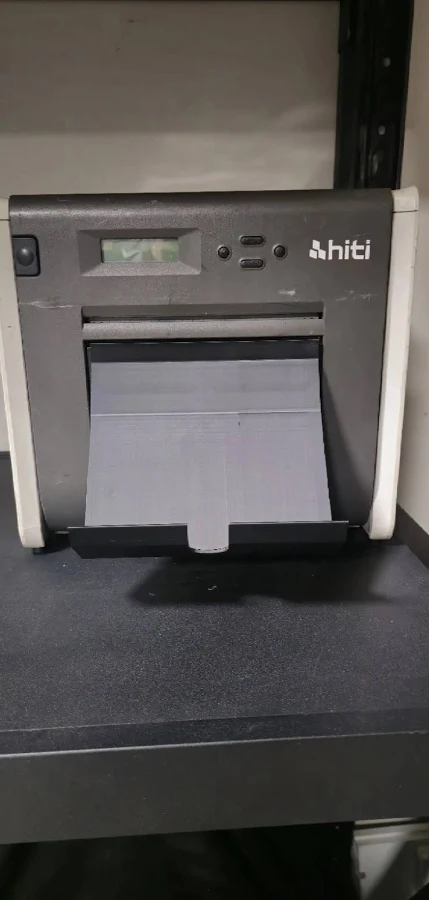
HiTi P525L Photo Booth Printer: Everything Operators Need to Know
Your printer can make or break the guest experience at an event.
When the queue is growing, you need fast, dependable printing—not paper jams, wet ink or photographs that smudge as soon as somebody picks them up.
The HiTi P525L photo booth printer is a popular dye-sublimation printer for weddings, parties, corporate events and on-location photography. It combines professional print quality with high-capacity media, flexible print sizes and a footprint suitable for many booth cabinets.
Whether you are building your first photo booth, upgrading from an inkjet printer or expanding an existing fleet, this guide explains what the HiTi P525L offers and what to check before buying.
Is the HiTi P525L a good photo booth printer?
Yes. The HiTi P525L is designed for high-volume applications such as photo booths, event photography and photo kiosks.
Unlike an inkjet printer, it uses dye-sublimation technology to produce prints that are dry as soon as they leave the printer. This helps prevent smudges when guests pick them up immediately—a major advantage during busy events.
Its key benefits include:
- Fast, consistent event printing
- Professional 300 dpi continuous-tone output
- Glossy and matte finish options
- Support for standard photos and photo booth strips
- High-capacity paper and ribbon media
- Front-loading media for easier installation inside a booth
- Windows and macOS driver support
- An LCD display for checking printer and media status
For operators who want a dedicated event printer rather than a general-purpose office or home printer, the P525L is a proven option.
How fast does the HiTi P525L print?
The HiTi P525L prints a standard 4×6-inch photograph in approximately 12.8 seconds. Approximate times for larger formats are:
- 4×6 inches: 12.8 seconds
- 5×7 inches: 18.5 seconds
- 6×8 inches: 20.5 seconds
Actual guest wait time will also depend on your booth software, image processing, template design and connection method.
For most weddings, parties and corporate activations, this speed is sufficient to maintain a steady flow—particularly when the booth workflow is configured and tested before the event.
What sizes can the HiTi P525L print?
The P525L is more versatile than a 4×6-only photo printer. Depending on the media installed and the print layout, supported formats include:
- 4×6-inch photographs
- 5×7-inch photographs
- 6×8-inch photographs
- 6×6 and 5×5 square prints
- 2×6 photo booth strips
- Smaller cut and perforated formats with compatible media
A pair of 2×6 photo strips can be produced from 4×6 media, making the printer suitable for traditional photo booth layouts. Larger media can be used for premium prints, branded event photography and alternative template designs.
Check which media kit your preferred print size requires before ordering. Changing between certain sizes may require changing the paper and ribbon.
How does dye-sublimation printing work?
Dye-sublimation printing uses heat to transfer colour from a ribbon onto specially coated paper. The printer applies yellow, magenta and cyan colour layers before adding a protective overcoat.
For a photo booth operator, this provides several practical benefits:
- Prints emerge dry and ready to handle
- Photographs resist fingerprints, splashes and smudging
- Colour and finish remain consistent across an event
- There are no inkjet nozzles to dry out between bookings
- Paper and ribbon are supplied as matched media sets
This consistency is why dye-sublimation printers are widely used for event photography and commercial photo booths.
How many prints does HiTi P525L media provide?
A standard HiTi P525L 4×6 media carton provides 1,000 prints in total, supplied as two 500-print paper-and-ribbon sets.
Typical carton capacities are:
- 4×6 media: 1,000 prints
- 5×7 media: 500 prints
- 6×8 media: 500 prints
Because the paper and ribbon are matched, you do not need to estimate ink usage separately. This makes it easier to calculate your cost per print.
Use this simple calculation:
Media carton price ÷ number of prints = consumable cost per print
Remember to include delivery, wastage and duplicate-print allowances when pricing your photo booth packages.
How much spare media should I take to an event?
Never arrive with only enough media for your expected number of prints. Guest numbers, repeat visits and duplicate copies can quickly increase consumption.
A sensible event checklist includes:
- Enough loaded media for the expected booking
- At least one complete spare paper-and-ribbon set
- Additional media for large or unlimited-print events
- A clean, dry place to store spare rolls
- A tested backup printing plan where practical
Tracking average print usage across your events will help you forecast stock more accurately. Reorder before reaching your final carton rather than relying on last-minute availability.
Can the HiTi P525L print from an iPad or Windows or WCM?
The P525L is primarily a USB-connected printer for Windows and macOS computers and WCM. It is not safe to assume that every iPad photo booth app can print to it directly.
HiTi offers optional wireless functionality using a compatible Wi-Fi dongle and its supported mobile-printing software. Whether this works for your booth depends on the device, operating system, app and workflow you use.
Before buying, confirm:
- That your photo booth software supports the P525L
- Whether it requires a Windows or Mac print server
- Whether an optional HiTi Wi-Fi dongle is needed
- That your chosen print size and cutting layout are supported
If you operate an iPad booth, ask your supplier to confirm the complete printing workflow—not simply whether the printer has a wireless accessory.
Can I use the P525L with a DSLR photo booth?
Yes. The HiTi P525L is well suited to DSLR photo booths controlled by a Windows PC or compatible Mac.
A typical setup connects the printer to the booth computer by USB. The photo booth software captures the image, applies the template and sends the finished file to the printer automatically.
The P525L can be installed in many enclosed and wooden booth cabinets, including DSLR-style booth builds. However, operators should check:
- Internal cabinet dimensions
- Ventilation around the printer
- Access for replacing paper and ribbon
- Space for the print tray and finished photographs
- Cable routing and power requirements
- The printer’s weight when transporting the booth
The printer measures approximately 327 × 300 × 359 mm and weighs around 18 kg before consumables and packaging, so include it when calculating transport weight.
Does the HiTi P525L work with photo booth software?
Many professional photo booth platforms can print through the operating system’s installed printer driver. Compatibility still depends on the software, computer and version you use.
Before your first paid event:
- Install the latest compatible HiTi driver
- Select the correct media and print size
- Disable unwanted scaling or border settings
- Confirm the orientation of your template
- Run several complete booth sessions
- Test duplicate prints and reprints
- Restart the full system and test it again
A printer being recognised by a computer does not guarantee that the final template will be cut, scaled or oriented correctly. Always test the complete workflow.
Can the P525L produce glossy and matte prints?
Yes. The P525L supports both glossy and matte surface finishes.
The finish is created during printing, so operators can offer different looks without changing to a different type of photo paper. Glossy prints provide a classic, vibrant appearance, while matte prints can suit premium weddings and branded corporate events.
Print time and media usage may depend on the selected settings, so test both finishes before adding them to a client package.
How do I maintain a HiTi P525L?
Good maintenance reduces the risk of marks, feed problems and failures during events.
Follow these basic practices:
- Keep the printer level and properly ventilated
- Store media in a cool, dry environment away from sunlight and dust
- Keep unused paper and ribbon in their protective packaging
- Handle ribbon and paper carefully to avoid fingerprints
- Keep drinks, glitter and loose decorations away from the printer
- Clean the printer using the manufacturer’s recommended procedure
- Inspect cables and power connections before each booking
- Transport the printer securely in a protective case
Do not leave media in a damp storeroom or hot vehicle between events. Sudden temperature changes can also cause condensation, so allow cold equipment to acclimatise before switching it on.
What are the disadvantages of the HiTi P525L?
No printer is right for every operator. Points to consider include:
- It is heavier than its compact footprint may suggest
- Direct mobile printing requires careful compatibility checks
- Switching media sizes can mean changing both paper and ribbon
- It requires space for ventilation and print output
- It is a professional event printer rather than a lightweight portable printer
These are not necessarily deal-breakers, but they should be considered when designing a booth or choosing transport cases.
Is the HiTi P525L better than an inkjet printer?
For regular paid photo booth work, a dye-sublimation printer such as the P525L is generally a better fit than a standard inkjet.
Dye-sub printing provides faster handling, consistent media costs and dry, durable output. Inkjet printers may cost less initially, but they can introduce slower drying, smudging and print-head maintenance—problems that are particularly inconvenient during a live event.
The best comparison is not simply the purchase price. Consider:
- Cost per finished print
- Printing speed
- Media capacity
- Reliability under event conditions
- Software compatibility
- Replacement-media availability
- Supplier and technical support
Where can I buy a HiTi P525L in the UK?
Choose a specialist supplier that understands photo booth workflows rather than judging the printer on price alone.
A knowledgeable supplier should help you confirm:
- Compatibility with your booth and software
- The right media for your required print sizes
- Cabinet dimensions and ventilation
- Driver and connection requirements
- Ongoing availability of consumables
- Setup, training and after-sales support
This can prevent an inexpensive purchase from becoming an expensive compatibility problem.
Is the HiTi P525L right for your photo booth business?
The HiTi P525L is a strong choice for operators who need dependable, professional printing for weddings, parties and corporate events. It offers high-capacity media, multiple print formats, fast dye-sublimation output and predictable consumable usage.
It is especially well suited to:
- DSLR booths using a Windows or Mac controller
- Enclosed or wooden photo booth builds
- Operators offering 4×6 prints and 2×6 strips
- Businesses running frequent, high-volume events
- Companies that want to add premium 5×7 or 6×8 options
For iPad booths, confirm the exact connection and software workflow before purchasing.
Buy Your HiTi P525L With Expert Photo Booth Support
A printer is not just another piece of equipment—it is part of the service your clients are paying for.
BoothStation can help you choose a compatible printer, media and booth setup for your event business. Whether you are starting from scratch, upgrading an existing booth or adding reliable printing to a new build, our team can help you create a system that is ready for paid bookings.